
Data Labs
Companies that have their product information in SQARP can seamlessly leverage the full power of Data Labs with native integrations, data model compatibility and automated workflows. You can find all ongoing, finished and cancelled Data Labs-jobs by pressing Data Labs in the left-hand menu.
How do I use Data Labs?
Navigate to your product listing page by pressing Products in the left-hand menu. Select the articles you want to edit and press Enhance using Data Labs.
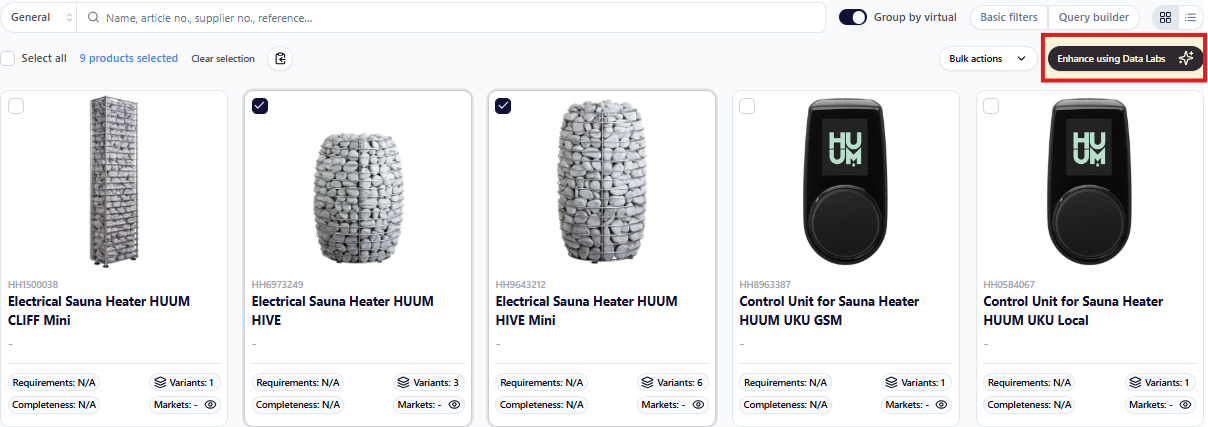
In the next view, choose the tool(s) you want to use to enhance your products with. You can create a workflow by choosing one or more Data Labs Tools.
All Data Labs Tools
- Categorizer
Link your products to a category tree (see My Categories) based on existing product information. - Mapper
Set values on the attributes for your products based on a category tree and what blueprints are linked to the same category node as the products. - Describer
Create descriptions for your product variants or virtuals based on the existing data related to your products, such as brand, usps, series and attributes. - Translator
Translate and generate product information in your desired languages from existing language data related to your products. - Image Classifier
Analyze your images and assign each image a type. - Alt Texter
Analyze your images and generate an alt text for each image. - Taric Code Classifier
Assigns taric codes to products based on available product information. Taric codes are validated against Tulltaxan's taric code tree, see https://tulltaxan.tullverket.se/ - Image Generator
Generate lifestyle and studio product images using AI. Supports reference images, prompt slots and batch runs. The Image Generator-feature supports prompts for general context (e.g brand-related) and image specific output prompts. - Bundle Image Generator
Generate lifestyle and studio product images using AI, supported for bundle articles. Supports reference images, prompt slots and batch runs. The Image Generator-feature supports prompts for general context (e.g brand-related) and image specific output prompts. The Bundle Image Generator can be used for creating images for several component articles into one image, e.g a furniture group consisting of a table and six chairs.
What is a credit?
Credits are the currency used for Data Labs jobs within SQARP, and you can view your credits overview in the top-right corner of the platform. Credit usage is reset every month. If you have questions about your credits usage or pricing, contact info@sqarp.com.